Document Author
The Document Author researches and writes a document or slide deck with you, inside a workspace. Describe what you want, watch it drafted into a live preview, keep asking for changes, and save the result into the workspace's Documents as Word, PowerPoint or Markdown.
At a glance
| Handle | @doc-author |
|---|---|
| Availability | Seeded in every organisation |
| Where you use it | A workspace's Documents tab — Author a document, or Edit on an existing file |
| Model tier | default |
| Autonomy | supervised (the platform default — the definition declares none) |
| Tools | write_canvas, web_search, web_fetch, market_data, currency_convert, calculate, current_time, generate_image, search_knowledge |
| Knowledge | The knowledge of the workspace the document is written in (declared bare, no fixed collection) |
| Canvas | canvas: single — one document per conversation |
| Routable | No — routable: false. It is a surface you open, not a delegate the Orchestrator picks. |
The authoring view
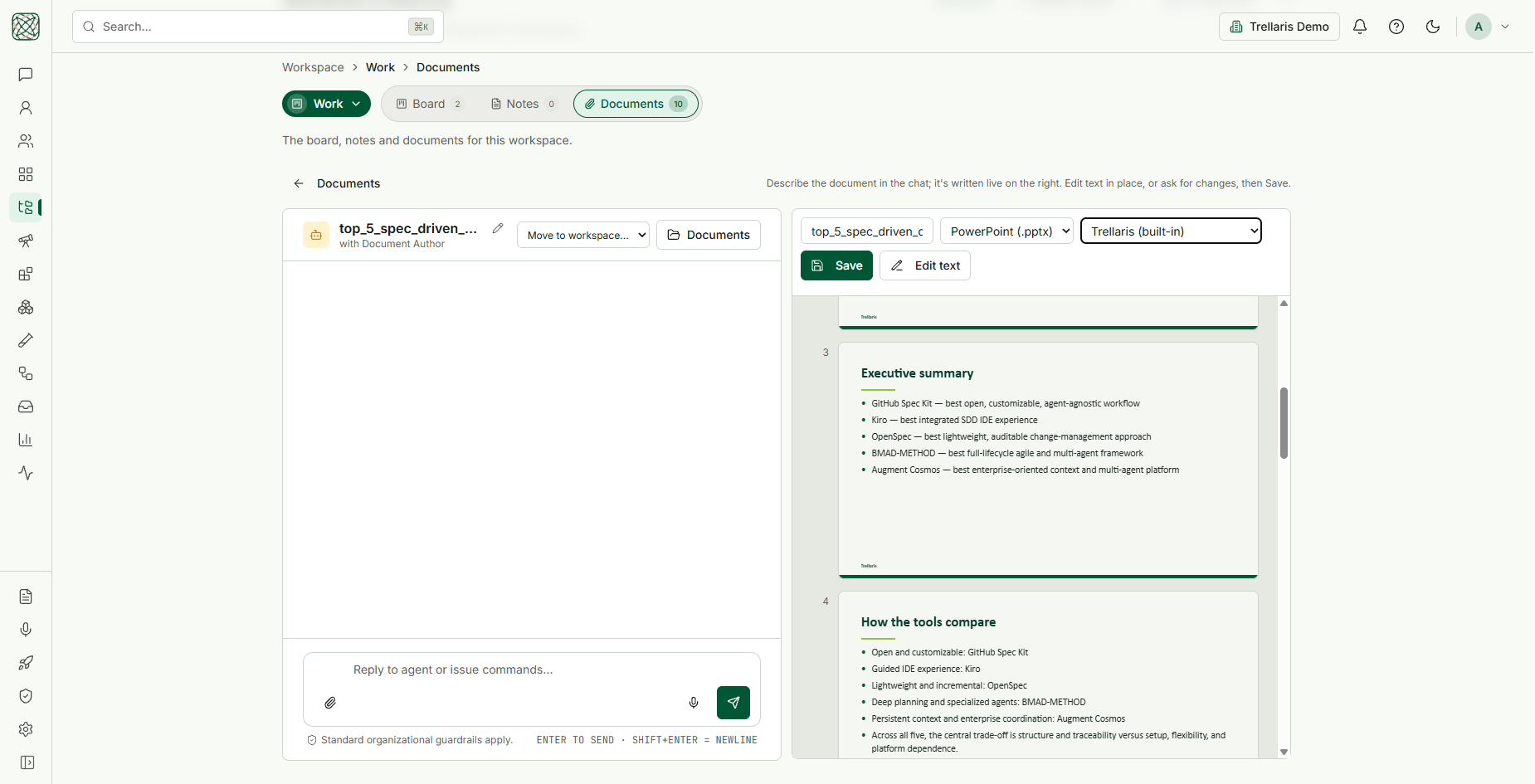
Open a workspace, go to Work → Documents and choose Author a document. The page splits in two:
- Left — the conversation. Tell the agent what you need ("a deck comparing the top five spec-driven development tools"). It replies in a sentence or two; the document itself never lands in the chat. Move to workspace… moves the draft and its conversation to another workspace, and Documents goes back to the file list.
- Right — the document. The file name, the format (Word (.docx), PowerPoint (.pptx) or Markdown (.md)), the template, Save, Edit text and Insert image, above a live preview: pages for a document, numbered slides for a deck.
Gather first, then draft
A document is only as good as the facts in it, so the agent fetches them
before it writes: web_search and web_fetch for
anything current, market_data for prices and changes,
search_knowledge for the workspace's own material (cited back to
the passage), calculate and currency_convert for
arithmetic, and current_time for today's date.
- No placeholder a tool could fill.
[TBD]orXX%is only for what no tool can know — your own internal numbers or opinions — and the agent says in chat which ones it left. - Every time-sensitive figure is dated and sourced, and the document ends with a short Sources section or slide.
- Markets are described, never advised on, with "Not investment advice." included once.
Documents and slide decks
Both are written as Markdown and built by the same code the preview uses, so what you see is what Save produces.
| Document | Slide deck | |
|---|---|---|
| When | Reports, memos, proposals — anything read top to bottom | You ask for a presentation, deck, slides or PowerPoint |
| Structure | One # title, ## sections, paragraphs, lists, tables | # is the title slide; each ## starts a slide of 3–6 one-line bullets |
| Preview | Pages | Numbered slides at the template's aspect ratio, text shrunk to fit |
| Save As default | Word | PowerPoint |
Templates
The template picker decides the look of the saved file. The default follows one rule: the workspace's chosen default for that format → the first template uploaded to the workspace → for PowerPoint, the built-in Trellaris 16:9 template → otherwise plain formatting. Pick No template for plain output. The slide preview reads its colours, fonts and slide size from the template file itself, so an uploaded template previews exactly as it will save. Templates are uploaded, and defaults chosen, on the workspace Settings tab.
Charts, diagrams and images
- Data charts are written into the document as a
chartblock holding an Apache ECharts option — the same format and the same validation as charts in chat — and drawn crisply in the template's palette in the saved file. Diagrams use Mermaid. - Logos and pictures from the web are fetched
once, when the agent writes, and stored with the document as
asset:links, so the file never depends on someone else's URL. PNG, JPEG, GIF and WebP up to 5 MB; SVG and white-on-transparent logos are refused. On a slide, a picture at the start of a bullet becomes an icon beside it (one per company); a line of pictures on its own becomes a captioned logo row. - Generated images — "create an illustration of…" — go
straight into the document through
generate_image. Illustrations and scenes only: never a real company's logo or a real person, and the agent says in chat that the image is AI-generated. - Insert image uploads a picture of your own.
Three ways to change it, cheapest first
-
Edit in place
Click a slide's title or a bullet in the preview and type, or use Edit text for the whole Markdown source. Your edit is saved as a revision and shown to the agent on its next turn, so the next instruction lands on your version. -
Quick edits, with no model call
A few commands typed in the chat have exactly one right answer and apply instantly:replace "Q3" with "Q4",change the title to "FY27 plan",delete slide 4,delete the "Appendix" slide. Slide numbers are the ones the preview shows. Anything that does not match exactly goes to the agent rather than being guessed at. -
Ask the agent
Everything else. The agent always has the whole current document (and, for a deck, the same numbered slide list you see), changes the part you mean and writes the complete document back, keeping the rest word for word. It never asks you to paste the document it is editing.
One document per conversation
The agent is declared canvas: single: every write revises the same
document, and asking for a new title renames it rather than starting a second.
Each document has one authoring conversation per person — reopen it later and
you resume that conversation with its draft intact. These conversations belong
to the document, so they do not clutter your chat list.
Saving and reopening
- Save writes the file into the workspace's Documents. With the name unchanged it overwrites the file you are editing; a new name or format saves a new file.
- Edit is offered on every Word, PowerPoint, Markdown and text file in Documents — uploads, agent outputs and chat attachments alike. A deck reopens as slides with its pictures, icon rows and charts (a chart comes back as its source, so it stays editable), in the template it was saved with — or, for a deck made elsewhere, in its own design.
routable: false means the Orchestrator will never delegate a step
to it. That is deliberate: the Document Author is a workspace surface
whose value is the live preview and the conversation around it, and a
delegated child run has nobody watching. For "write me a document" in ordinary
chat, the Assistant and
Deep Research both carry
generate_document and return a file.
tool_called
assertion, read from the run's trace). See
Playground.