Secure code execution
An agent can run code — crunch a spreadsheet, draw a chart, build a PDF, transform a file — and every run happens in a sandbox that exists for that run alone: it starts empty, has no network, holds no credentials, runs as nobody, and is gone the moment the script ends. The files it writes come back into the thread as downloadable artifacts. In production each run is its own hardened Kubernetes pod, optionally its own lightweight VM.
What a person sees
Ask for something that needs computation, and the agent writes and runs a script:
Simulate 12 months of a subscription business at 6% growth and 2% churn.
Write the table to customers.csv and a chart to customers.png, then summarise.
The Activity row shows code_execution ran; the
files the script wrote to its output directory arrive as links in the
answer and in the thread's Artifacts tab. The script
itself, its output and its timing are on the run's trace in
Observe, like any other tool call.
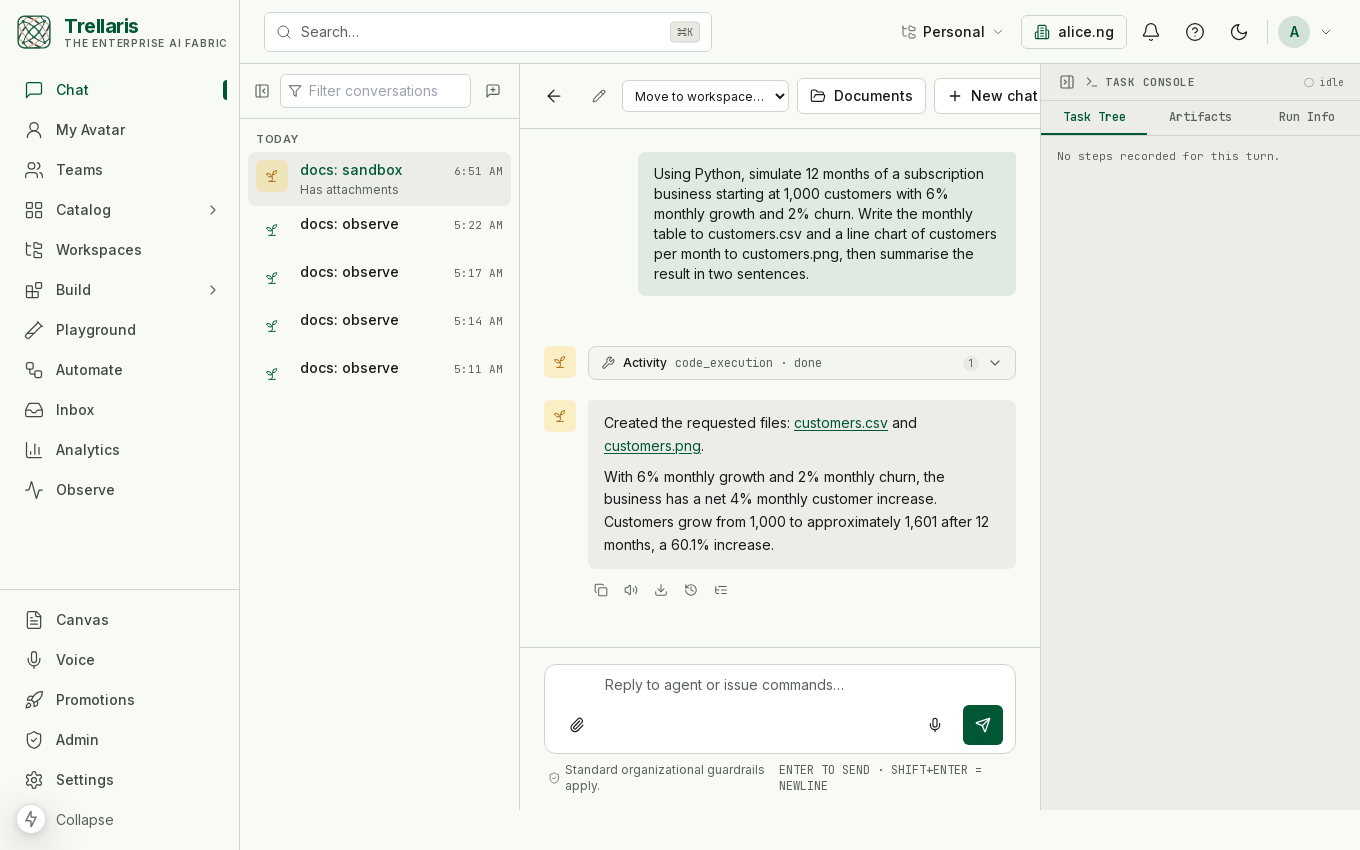
customers.csv and customers.png, and the answer links them.What runs there
| Entry point | Who uses it | What it does |
|---|---|---|
code_execution | Any agent that declares the tool — the built-in Assistant and Deep Research do | Runs a Python or Node script the model wrote, with the run's earlier artifacts staged as inputs. Files written to /out come back. |
run_skill_script | Agents with a skill attached | Runs one of the skill's declared entrypoints with arguments — five of the six shipped skill bundles (chart builder, CSV cleaner, data profiler, calendar scheduler, PDF report) are scripts. |
| The skill test bench | Builders, in the Playground and on a skill's page | Runs an entrypoint through the same sandbox before the skill is proposed for promotion. |
The sandbox image ships with Python 3.12 and Node 20, plus the libraries a data task needs — numpy, pandas, matplotlib, pillow, reportlab, fpdf2, pypdf — and no package managers: pip, npm and apt are removed, so nothing can be installed at run time even if a script somehow found a network.
How a run is isolated
Two drivers behind one interface. Development uses a child container over the Docker socket; staging and production use one Kubernetes pod per run, created through the API server and deleted afterwards. Nothing above the driver knows which one ran.
| Control | In production (one pod per run) |
|---|---|
| Identity | Non-root user, no service-account token, no service links — the pod cannot talk to the cluster it runs in. |
| Filesystem | Read-only root; /work, /out and /tmp are memory-backed scratch with a size cap, wiped with the pod. |
| Privileges | Every Linux capability dropped, no privilege escalation, the runtime's default seccomp profile. |
| Network | A deny-all network policy on every sandbox pod: no ingress, no egress, not even DNS. |
| Runtime | A hardened runtime class on the pod itself — gVisor, or Kata VM isolation so each run is its own lightweight virtual machine — on a tainted node pool that runs nothing else. |
| Time and size | A wall clock that kills the run, a pod deadline as backstop, CPU and memory limits, a per-person concurrency cap. |
| Lifetime | Created for the run, deleted after it. Never reused, never shared. |
The image is built with every deploy and pinned by digest, so what runs in the sandbox is exactly what was built and reviewed.
What you control
- Who may run code.
code_executionandrun_skill_scriptare ordinary tools: a tool allow-list policy removes them from any scope, and an agent only has them if its definition declares them. - How much. Wall clock, memory, CPU, scratch size and the per-person concurrency cap are platform settings; the defaults are 60 seconds, 512 MiB, half a vCPU, three runs at once.
- What comes out. Output is capped and passes through DLP on its way back to the model, like every tool result; artifacts land in object storage under the run.
- Whether it is on at all. With the driver set to disabled the tools refuse with a clear error, never a broken run — the honest state for a cluster that has not been given a sandbox yet.
Where it shows up
- Chat — the Activity row, the artifact links, the Artifacts tab.
- Automations and channels — the same tool through the same runtime; a scheduled report that builds a PDF runs in a sandbox too.
- Playground and skills — the test bench for a skill's entrypoints.
- Observe — every run is a tool step with its input, output and duration.
Honest limits
- A script that needs the web cannot have it. Reaching the web is the job of the governed
web_fetchandbrowser_usetools, whose results the run can hand to the sandbox as inputs. - VM isolation needs a node pool with a sandboxed runtime; without one the pod hardening and the network policy still apply and the runtime class is simply not set.
- The network policy needs a cluster network that enforces it. The deployment's smoke test checks this and says so if it does not.
- A process-count limit is per node in Kubernetes, not per pod; the kubelet setting covers it.
Turning it on
One value in the Helm chart selects the driver; the deploy pipeline builds the image and pins its digest; the chart adds the role the platform needs, the network policy, and the environment the driver reads. The Deployment page has the shape of the cluster; the operations runbook has the checklist for the sandbox node pool and the smoke test that proves a cluster is ready.