Workspaces
A workspace is where work lives. Every conversation, run, agent, skill, document and knowledge collection belongs to one, and workspaces are first-class: named, shared and governed, not just a personal scratch area.
Default and named workspaces
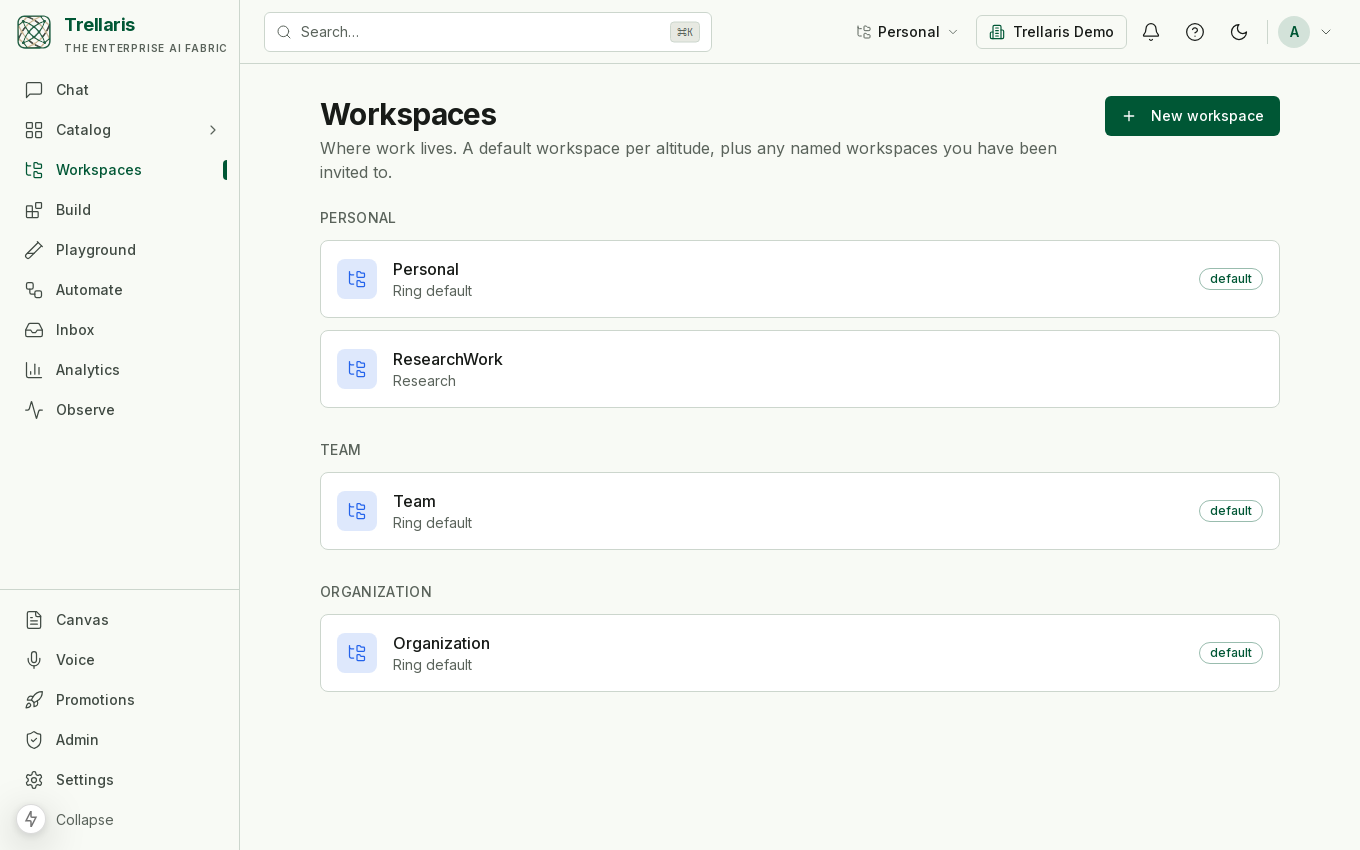
Every user has a default Personal workspace, every team a default Team one, and every org a default Organisation one. On top of those, anyone can create named workspaces, such as a project space or a research space, each with its own membership, its own board and its own process.
Nothing is unscoped
There is no "no workspace". A conversation or run with no explicit choice lands in your Personal default; picking a workspace in the switcher at the top of the app scopes what you are viewing and pre-fills where new things are created. A workspace is never ambient on a write: every creation surface shows the destination as a visible, editable field reading "My Personal workspace (default)" until you change it, so you always know where an agent, a skill or a collection is about to go.
Inside a workspace
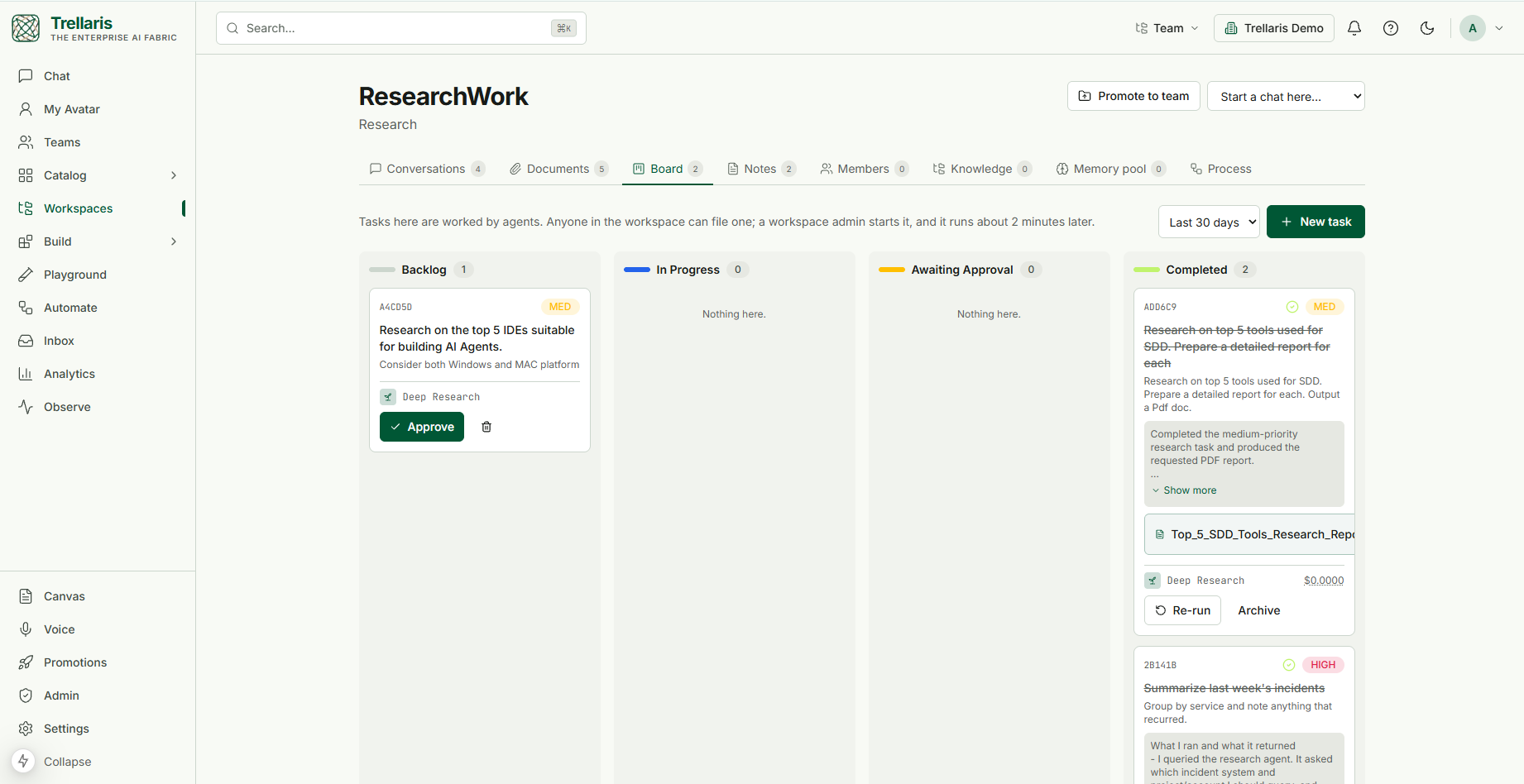
Open a workspace from Workspaces in the navigation and you land on its home: the name and description, a ring badge, a Start a chat here picker that opens a conversation scoped to this workspace with the agent you choose, and, for a personal named workspace, a Promote to team action. Below that, eight tabs, each carrying a count of what it holds.
Conversations
Every conversation started in this workspace, newest first, with the number of runs it has produced. Start one with the picker above the tabs, or open any existing chat and use Move to workspace in its header to bring it here. Because a conversation belongs to exactly one workspace, a colleague who shares the workspace can see its runs, which is the whole point of a shared space, and also why nothing here is ever implicit.
Documents
Files the workspace holds: drop them onto the panel or use the upload button, browse as a list or a grid of file-type icons, search by name, and remove what is no longer needed. Documents belong to the workspace and are visible to its members. Files are stored in object storage; only their references travel through the platform.
Author a document opens a chat with the Document Author beside a live preview of the document or slide deck it writes, and Edit on any Word, PowerPoint, Markdown or text file reopens it there. Saving applies the workspace's document template and, with the name unchanged, overwrites the file you opened.
Board
Tasks here are worked by agents, not people. Anyone in the workspace can file one: a title, a description of what done looks like, a priority, and the agent that should do it. A workspace admin approves the task, which schedules it as a one-shot wake-up; it starts about two minutes later and moves across the columns on its own.
- Backlog: filed, waiting for approval.
- In progress: the run is live. A task that has been scheduled but has not produced a run past its fuse shows as overdue in amber, which usually means the worker or beat is down rather than the agent being slow.
- Awaiting approval: the agent asked for a human decision mid-run, exactly as it would in chat; the approval card lives in your Inbox.
- Completed: the result lands on the card with its cost, any files the agent produced attached, and the original title struck through. Re-run files the same task again; Archive removes it from the board.
A card that has already started can only be stopped from Observe, where its trace is. The range picker above the columns limits the board to recent tasks.
Notes
Everything on the board that is not a task: short notes members add, and artifacts pinned from a run. Each carries its kind and, where the workspace has a process, its stage. The Board and the Notes tab read the same list of workspace items; tasks are simply the ones an agent works.
Members
Who is in the workspace and at what role. A maintainer can edit the workspace, its process and its membership; a contributor can work in it. Memberships are explicit rows resolved per request. Two cases look empty for opposite reasons: a default workspace has no member rows because everyone at that altitude is already in it, and a personal named workspace cannot have members at all; promote it to team altitude to collaborate.
Knowledge
The knowledge collections that live in this workspace, with their descriptions. Collections are created from Build → Knowledge with the workspace chosen in the destination field, and an agent running here can attach them by name.
Memory pool
A shared memory every member can read, written by the
remember_for_workspace tool: a team decision, a glossary
term, a convention. It is a separate tool from the personal
remember on purpose, because writing to a pool other people
read is a different governance act from writing a note to yourself.
Process
An optional, ordered list of stages the entities in this workspace move through (for example draft → review → live), edited here by a maintainer rather than in the admin console. Each transition names the gates it runs, reusing the ones the promotion path already has: scan and evals, which apply to agents and skills, and approval, which applies to everything. The editor warns when a gate does not apply to a kind before you save. Attaching a process grandfathers what is already in the workspace to the last stage, with an opt-in to reset everything to the first stage instead; gating invocation on stage is a separate switch, and an author can always reach their own draft.
Promoting a workspace
A personal named workspace can be promoted to team or organisation altitude as one unit. The crossing is a single review event that lists every contained agent and skill with the gates it passed or failed (version, scan, autonomy, evals, and stage where a process applies), and it refuses to proceed while any contained entity is ungated, so the container route is never a way around the gates. On approval the ring flips, skill pins are frozen on the promoted copies, and the initial members are seated.
Blueprints and guardrail floors
An org can stamp a new workspace from a blueprint: a manifest of starter agents, skills, seed policies, settings and member roles, so a new team space starts governed on day one. A blueprint can set a policy floor, a minimum strictness a narrower scope may tighten past but never loosen. Setting a floor is org-admin-only, and there is deliberately no break-glass bypass.
Stage-gated processes
The process a workspace declares is enforced at the one execution path and at promotion: an entity that has not reached the terminal stage cannot be promoted out of the workspace, and, when invocation gating is on, cannot be invoked by anyone but its author. Absence of a process is the single implicit stage, so untouched workspaces behave exactly as before.