Connectors
A connector is a tool that reaches an external system as the user. It is the platform's answer to the hardest part of enterprise agents: letting an agent act in ServiceNow, a calendar, or a mailbox without ever holding a shared god-credential.
The core idea: delegated identity
Each user connects their own account once. From then on, when an agent calls a connector on that user's behalf, the platform resolves that user's OAuth token at call time and sends only that. Two people asking the same agent the same question get their own data back.
connector.credential_required error. A write never executes without
the user's own credential.
Operations
Each connector exposes a small set of named operations, and every operation is tagged. The tag is what governance keys on:
| Tag | Meaning | Behaviour |
|---|---|---|
| read | Fetches data, changes nothing. | Runs immediately. |
| write | Creates or modifies something. | Parks for approval under supervised autonomy. |
| destructive | Irreversible — delete, close, purge. | Parks even under trusted autonomy. |
Available connectors
Browse these in the app under Catalog → Connectors, and connect your own accounts under Settings → Your connections, which shows every connector by category with its operations and whether you have connected it. 25 connectors ship today across seven categories, plus the knowledge sources listed at the end. Every operation below carries the tag governance keys on: read runs at once, write parks for approval under supervised autonomy, and destructive parks even under trusted autonomy.
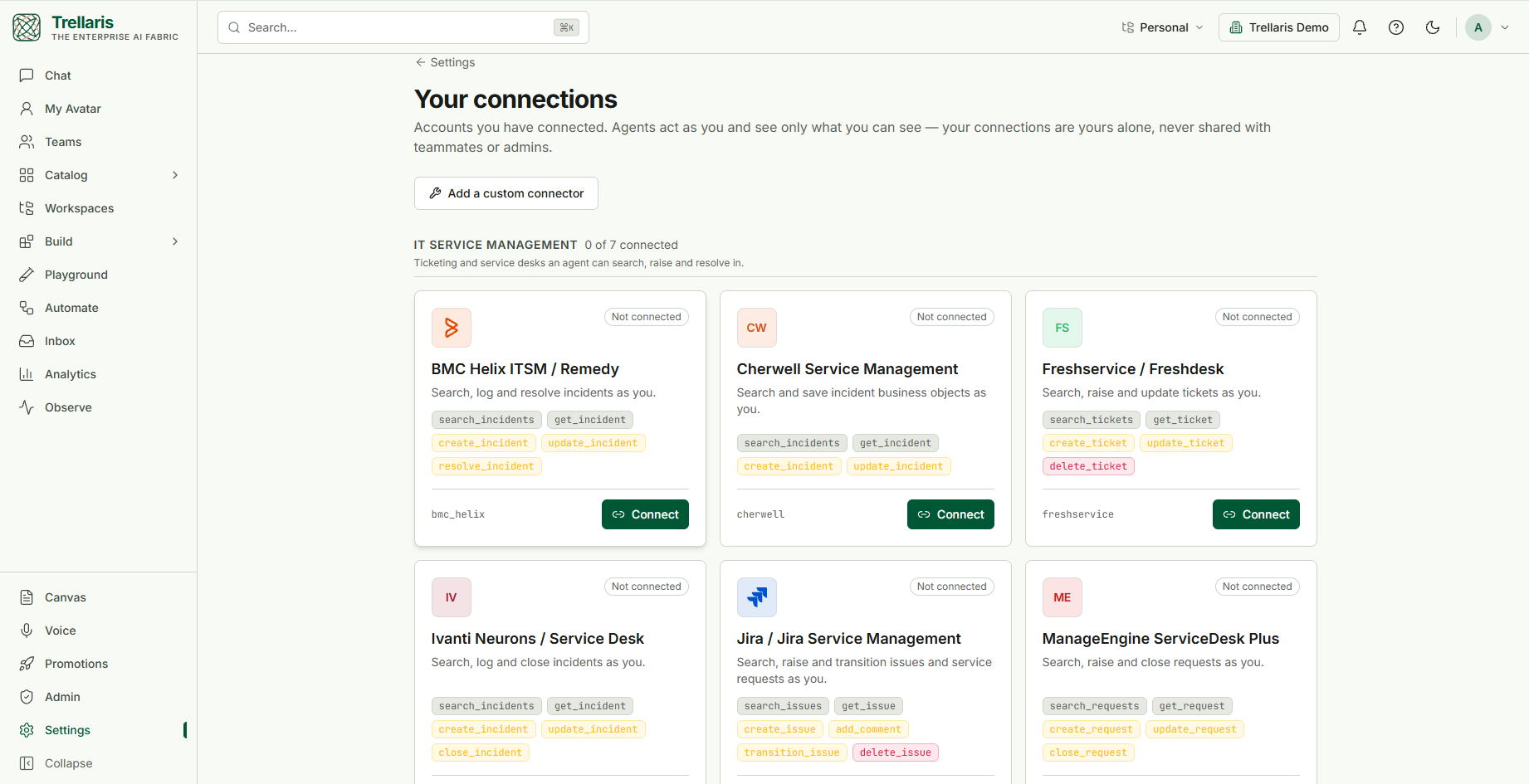
IT service management
Ticketing and service desks an agent can search, raise and resolve in.
| Connector | What it does | Operations |
|---|---|---|
ServiceNowservicenow |
Search and file incidents as you. Cloud and on-premise instances alike. | search_incidents create_incident delete_incident |
Jira / Jira Service Managementjira |
Search, raise and transition issues and service requests as you. | search_issues get_issue create_issue add_comment transition_issue delete_issue |
BMC Helix ITSM / Remedybmc_helix |
Search, log and resolve incidents as you. | search_incidents get_incident create_incident update_incident resolve_incident |
Freshservice / Freshdeskfreshservice |
Search, raise and update tickets as you. | search_tickets get_ticket create_ticket update_ticket delete_ticket |
Cherwell Service Managementcherwell |
Search and save incident business objects as you. | search_incidents get_incident create_incident update_incident |
Ivanti Neurons / Service Deskivanti |
Search, log and close incidents as you. | search_incidents get_incident create_incident update_incident close_incident |
ManageEngine ServiceDesk Plusmanageengine |
Search, raise and close requests as you. | search_requests get_request create_request update_request close_request |
CRM and support
Customer records and cases, filtered by the caller's own sharing rules.
| Connector | What it does | Operations |
|---|---|---|
Salesforce Service Cloudsalesforce |
Query and update cases; your sharing rules decide what an agent sees. | search_cases get_case create_case update_case delete_case |
Zendesk Supportzendesk |
Search, raise and reply to customer tickets as you. | search_tickets get_ticket create_ticket add_comment update_ticket delete_ticket |
Dynamics 365 Customer Servicedynamics365 |
Search, open and resolve cases as you. | search_cases get_case create_case update_case resolve_case |
HubSpot Service Hubhubspot |
Search tickets and contacts, and raise tickets as you. | search_tickets get_ticket search_contacts create_ticket update_ticket delete_ticket |
Intercomintercom |
Search conversations and reply to customers as you. | search_conversations get_conversation search_contacts reply_conversation close_conversation |
Zoho Deskzoho_desk |
Search, raise and update helpdesk tickets as you. | search_tickets get_ticket create_ticket add_comment update_ticket |
Mail, files and calendar
Everyday work an agent reads and acts on as you.
| Connector | What it does | Operations |
|---|---|---|
Gmailgmail |
Search and read your mail, and draft replies. Drafting and sending always need your approval; label and trash changes need a wider grant. | list_messages get_message create_draft send_message modify_labels trash_message |
Google Calendargoogle_calendar |
Read your agenda and find free time. Read-only unless an admin widens the scope. | list_events find_free_time create_event |
Google Drive & Docsgoogle_drive |
Search Drive and read your Docs. Read-only unless an admin widens the scope. | search_files read_document create_document append_to_document |
Calendar (demo)calendar |
The mock-backed calendar used in development. Use Google Calendar for a real account. | list_events find_free_time create_event |
Communications
Chat, mail, calendar and meetings an agent reads and posts to as you.
| Connector | What it does | Operations |
|---|---|---|
Slackslack |
List channels, read history and post messages as you. Built-in agent: Slack Assistant (@slack-assistant). |
list_channels channel_history post_message |
Microsoft Teamsmicrosoft_teams |
Post to team channels and chats as you. | list_teams list_channels send_channel_message send_chat_message |
Microsoft 365 (Outlook)microsoft365 |
Outlook mail, calendar and contacts; read and act as you. | list_messages get_message send_mail list_events create_event list_contacts create_contact |
Zoomzoom |
List and schedule meetings, and list recordings as you. Built-in agent: Zoom Meetings (@zoom-meetings). |
list_meetings get_meeting create_meeting list_recordings |
SLACK_CLIENT_ID / ZOOM_CLIENT_ID) and client secret
(in the secret store, as slack_client_secret /
zoom_client_secret). The built-in agent for each appears at the
next sign-in once the client id is set.
- Redirect URL for both apps:
https://<your web host>/connectors/callback— the web host, not the API host. - Slack: add the permissions under User Token
Scopes, not Bot Token Scopes:
channels:read,groups:read,channels:history,groups:history,chat:write. Token rotation may be on or off. - Zoom: a user-managed General App. Its scopes are set
on the app, not requested at sign-in:
meeting:read:list_meetings,meeting:read:meeting,meeting:write:meeting,cloud_recording:read:list_user_recordings(or the classicmeeting:read,meeting:write,recording:read). - When the provider refuses — a revoked token, a missing permission, a channel you are not in — the agent is told which, and asks you to reconnect or join rather than retrying blindly.
Developer
Code hosts and issue trackers.
| Connector | What it does | Operations |
|---|---|---|
GitHubgithub |
Search issues and pull requests, and comment or open issues as you. | search_issues get_issue list_pull_requests create_issue comment_issue close_issue |
Privileged access
Remote support and privileged sessions. Every state change is approval-gated.
| Connector | What it does | Operations |
|---|---|---|
BeyondTrust Remote Support / PRAbeyondtrust |
Review sessions and Jump Items. Starting or ending one always needs approval. | list_sessions get_session list_jump_items start_session terminate_session |
Agent platforms
External agent runtimes this platform can delegate work to.
| Connector | What it does | Operations |
|---|---|---|
Azure AI Foundryazure_foundry |
Delegate work to a Foundry agent; its reply comes back as a tool result. | ask_agent |
Copilot Studiocopilot_studio |
Hand a question to a Copilot Studio bot and relay its answer. | ask_bot |
Knowledge sources
These are not tools an agent calls; they are sync sources attached to a knowledge collection. A scheduled sync pulls content for agents to search and cite, mirroring each document's readers so a colleague never retrieves a page they could not open at the source. Details are on the Knowledge & memory page.
| Source | What syncs |
|---|---|
Confluenceconfluence | Sync reads only the pages you can already see. |
Google Drive (knowledge sync)gdrive | Scheduled sync reads only the files you can already see. Separate from Google Drive & Docs above, which agents search on demand. |
SharePoint Onlinesharepoint | Sync reads only the site files you can already see. |
Boxbox | Sync reads only the files you collaborate on. |
Dropboxdropbox | Sync reads only the files shared with you. |
Notionnotion | Sync reads the pages shared with the integration. Notion cannot report per-page permissions, so synced pages stay visible only to you. |
Guruguru | Sync reads your cards. Guru cannot report per-card permissions, so synced cards stay visible only to you. |
Quipquip | Sync reads only the threads you are a member of. |
The list grows in one place: a connector is one adapter module behind the same protocol, and the catalog, the connect flow, the approval gate and the audit trail come for free. Anything not listed can usually be reached today as a custom connector, below.
Custom connectors: any REST API, no code
When an internal or niche tool has no built-in adapter, an org admin can configure a custom HTTP connector — from Settings → Connectors → Add a custom connector — with no code and no deploy. A custom connector is a description, not a program:
- a base URL and an auth method — OAuth 2.0 (authorize/token URLs, client, scopes) or a static bearer token entered per user;
- a list of operations, each a method + path with
{braces}for path parameters, tagged read or write.
What you configure becomes a real connector: an agent declares it by slug like any other, the call is delegated as the requesting user, writes park for approval, and every call runs through the one execution path. Path parameters are filled from the model's arguments and, for a write, the remaining arguments become the JSON body.
Knowledge sources (Confluence, Google Drive) also use delegated OAuth, but they are not agent-callable tools — they sync documents into knowledge collections, mirroring each document's source permissions so retrieval stays permission-aware.
Using a connector in an agent
Add the connector name to the agent's tools. That's the whole grant.
---
name: exec-assistant
model: default
tools:
  - calendar
---

# Role
Book meetings on the user's calendar. Always confirm a slot before creating it.
The model sees one calendar tool whose schema lists the available
operations, and picks an op plus arguments.
The connect flow
-
Consent
The user starts a connection (from settings, or from a Connect card in chat). The platform builds an authorization-code + PKCE request and redirects to the provider. -
Callback
The provider redirects back with a code, which the platform exchanges for tokens server-side. -
Vault
Tokens are encrypted at rest and referenced indirectly. They are decrypted only server-side at call time and never returned through the API. -
Use and refresh
A background sweep refreshes tokens before expiry. If a run parked waiting on the connection, completing consent resumes it automatically.
Lifecycle and safety
- Revocation is immediate — credentials are resolved per call, so a disconnected connector stops working on the very next call, not at the next token refresh.
- Deprovisioning cascades — removing a user revokes all of their connector credentials, disables their automations, and cancels their runs.
- Health checks — each connector exposes a cheap liveness probe that runs on a schedule.
- DLP applies — data read back from an external system is screened before it reaches the model, and outbound arguments are screened too.
- Everything is audited — connect, disconnect, every invocation, and every approval decision.
- An administrator decides which connectors exist — Admin → Infrastructure → Connectors lists every connector, and one switch turns each on or off for the whole organization. A connector that is off is hidden from everyone, cannot be connected, and is not offered to an agent that declares it: the agent tells the user the connector is not available and to contact their administrator (it still saves, with a warning). Knowledge sources of that kind stop syncing but keep what they already imported, so switching it back on resumes where it left off. Everything starts on.
How connectors differ from MCP servers
| Connector | MCP server (Tools Library) | |
|---|---|---|
| Identity | The end user, via delegated OAuth | A registered server credential (vault reference) |
| Declared as | tools: [calendar] | mcp_servers: [{slug: …}] |
| Shape | One tool with an op, built in-platform | Many tools discovered from the server |
| Best for | Per-user SaaS access where "who is asking" matters | Bringing an existing tool ecosystem in, governed centrally |