Skills
A skill is a packaged, reusable playbook: instructions that tell an agent how to do something well, plus optional scripts it can run in the sandbox. Skills carry know-how, never credentials and never access.
The definition: SKILL.md
A skill is a bundle: SKILL.md at the root, and any scripts and
reference files beside it. The frontmatter declares what the skill is and
what it may run; the body is the procedure the agent reads.
---
name: csv-cleaner
description: Normalise messy CSV data deterministically and report every change.
tags: [data, utility]
version: 1
allowed_tools: []              # must be a SUBSET of the agent's tools
entrypoints:                   # scripts that may run in the sandbox
  - path: scripts/clean.py
    runtime: python3.12
    examples:
      - name: basic
        args: ["input.csv", "--dedupe"]
        description: Trim, dedupe and coerce types.
---

# csv-cleaner

## When to use
The agent has a CSV file whose headers, types or duplicates are inconsistent
and needs a clean copy plus a report of what changed.

## How input reaches the script
The sandbox has no network and cannot read conversation attachments. All input
arrives as command-line arguments (argv). Write any files you want to return
under /out.

## Procedure
1. Run `scripts/clean.py` with the file path and the flags the user asked for.
2. Return the cleaned file and summarise the change report.
| Field | Meaning |
|---|---|
name, description, tags | What the catalog shows and what semantic search indexes. The name becomes the slug. |
version | An integer, starting at 1. Every save that changes the bundle creates a new immutable version. |
allowed_tools | The tools the skill's procedure needs. Checked against the agent that attaches it; a skill can never widen access. |
entrypoints | A list of scripts that may run, each with a path inside the bundle, a runtime (python3.12 by default) and optional examples of arguments the test bench can replay. |
allowed_tools is checked against what the agent grants. If a skill
lists a tool the agent does not have, the skill's script is refused rather
than silently escalating. Skills package procedure; agents package
permission.
Authoring a skill in the app
Catalog → Skills → New skill opens the skill editor. You
author the bundle in place: SKILL.md and its scripts as files
in the panel on the left, a Monaco editor for whichever file is selected,
and live frontmatter validation on the right. Or switch to
Upload .zip bundle and upload a zip with
SKILL.md at its root plus a scripts/ folder.
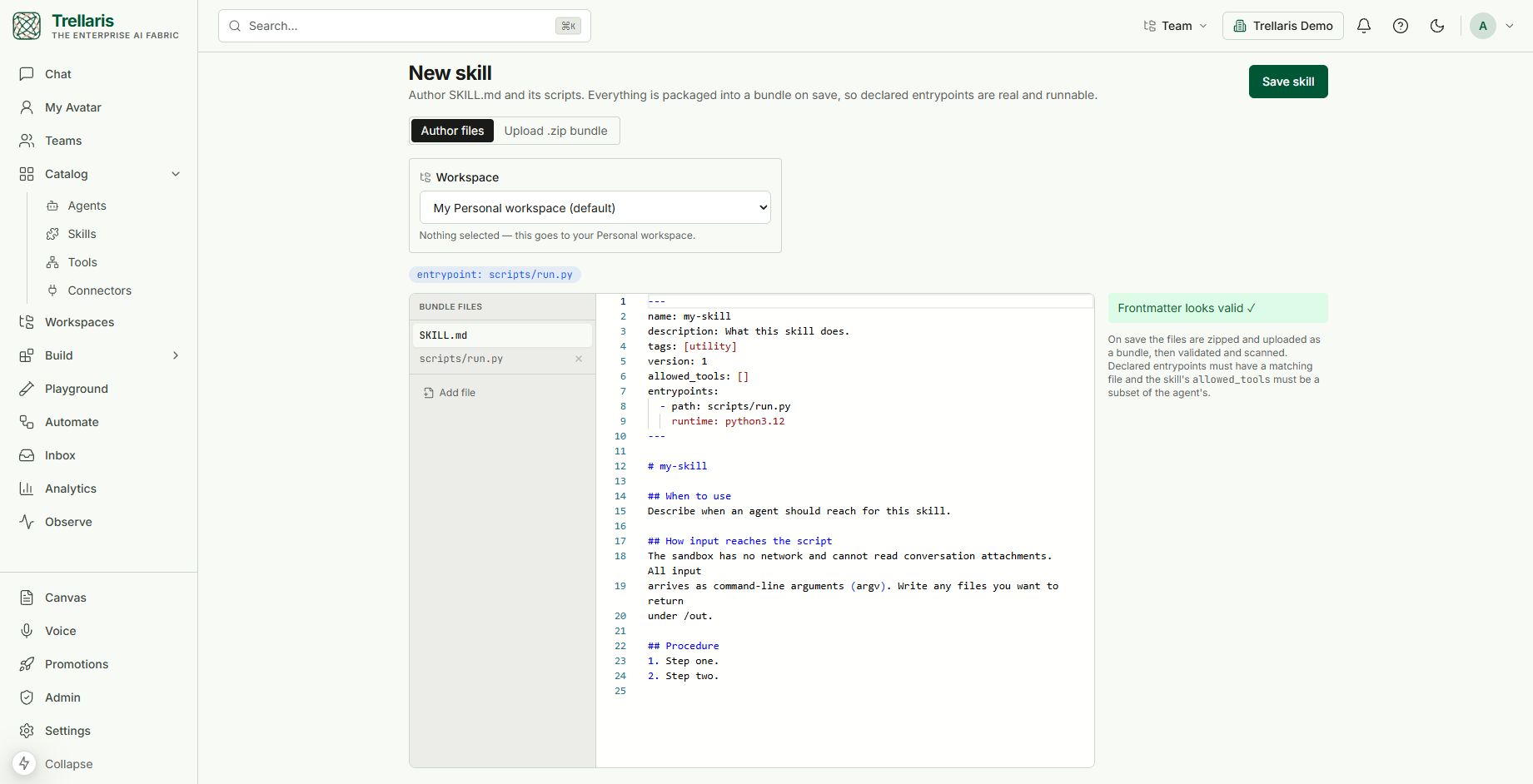
- Workspace. The destination is a visible field, "My Personal workspace (default)" until you change it. Members author in their personal ring; a skill reaches a shared ring through promotion.
- Bundle files. The starter bundle is
SKILL.mdplusscripts/run.py; add files with Add file and remove them from the list. The declared entrypoints appear as chips above the editor. - Validation. The frontmatter is parsed as you type. On Save skill the files are zipped and uploaded as a bundle, then validated and scanned. Every declared entrypoint must have a matching file, and
allowed_toolsmust be a subset of the attaching agent's tools. - The starter script.
scripts/run.pyreads its arguments fromargv, writes anything it wants to return under/out, and prints a one-line summary. That is the whole contract with the sandbox: no network, no access to conversation attachments, files in/outcome back as run artifacts.
Progressive disclosure
Skill instructions can be long, and loading every attached skill into every
prompt would be wasteful. Instead the agent sees a compact index
of its skills and pulls in detail only when it needs it, through load_skill:
- Index: name and description of each attached skill, always present.
- Body: the full SKILL.md procedure, loaded when the agent decides the skill applies.
- Reference: a specific supporting file from the bundle, loaded on demand by path.
Skills that run code
Declared entrypoints run through run_skill_script in the same
isolated sandbox as code_execution: no network, capped
memory, CPU and wall-clock time, a non-root user, package managers
removed, and numpy, pandas, matplotlib and pillow available. Files written
to /out come back as run artifacts, downloadable from the
conversation and from Observe.
Two gates apply before a script runs:
- The path must be a declared entrypoint; an arbitrary file in the bundle cannot be executed.
- The skill's
allowed_toolsmust be a subset of the agent's tools.
The skill page
Every skill has a page in the catalog with five parts:
| Part | What it does |
|---|---|
| Definition | The current SKILL.md and the bundle's file list, with the scan badge for the current version. |
| Versions | Every immutable version. Create a new one from an edited bundle, roll the pointer back to an earlier one, and view the diff between any two. |
| Test bench | Pick a declared entrypoint, give it arguments, and run it through the real sandbox. Output, errors and artifacts come back inline, and no run record is created. |
| Used by | The agents that reference this skill, so you know who is affected before you change it. |
| Playground | Skills appear in the Playground beside agents, so a builder can edit, test and certify an agent and the skills it depends on in one place. |
The catalog
Catalog → Skills lists every skill you can see, filtered
by ring (personal, team, org, public) and searchable semantically, so
"make a chart from JSON" finds basic-chart-builder without
knowing its name. Each card shows the ring, a scan badge and whether it
is new.
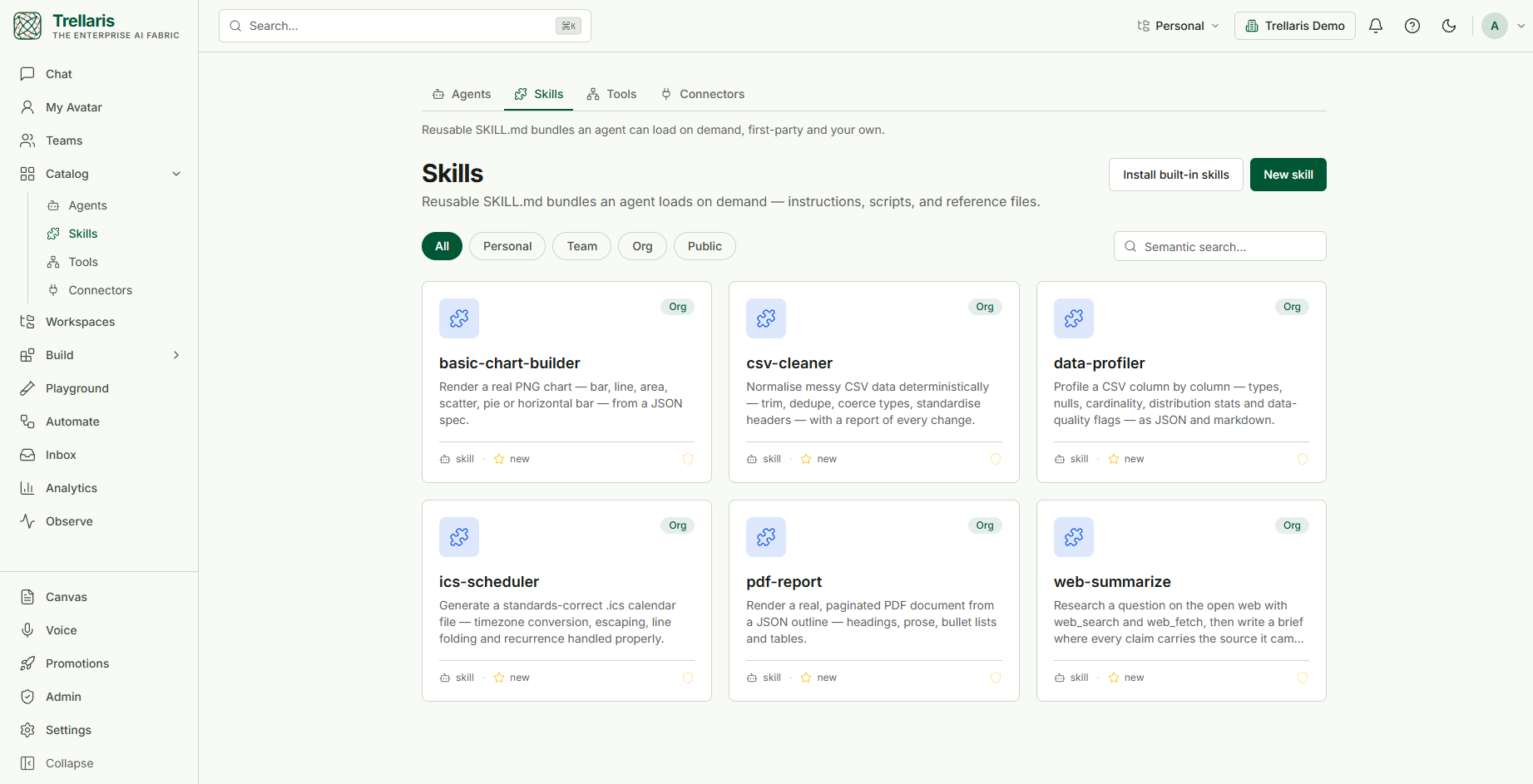
Install built-in skills seeds the thirteen first-party
skills that ship with the platform into your org ring, all scan-passed:
among them basic-chart-builder, csv-cleaner,
data-profiler, ics-scheduler,
pdf-report and web-summarize, plus the research
method and playbooks. They are ordinary skills once installed: attach
them, pin them, read their bundles, and use them as a starting point for
your own. Each one is documented under
Built-in skills.
Versions and pinning
Like agents, skill versions are immutable with a pointer to the current one, and every version is scanned. How an agent references a skill matters:
| Reference | Resolves to | Use when |
|---|---|---|
csv-cleaner | Whatever is current; it floats. | You want improvements to flow through automatically. |
csv-cleaner@3 | Exactly version 3, forever. | You need stability against upstream edits. |
When an agent is promoted to a shared ring, its skill references are frozen on the promoted copy. The shared agent cannot change underneath its users just because the author kept editing, while the author's personal original keeps floating. Promoting a whole workspace freezes the pins of every agent inside it the same way.
Who can build skills
Every member can create skills in their personal ring and edit what they authored there. Builders and team admins can edit what they authored at any altitude, and an org admin can edit anything. The skill page hides the controls you cannot use rather than refusing them. A skill reaches the team or org ring only through promotion, which runs the scan gate first; a version that has not passed its scan cannot be published to a shared ring.
The Skill Workshop
Agents notice repetition. When one does, it can call propose_skill to
draft a playbook into the workshop for review. The proposal can be revised
conversationally, then applied, which validates it and creates a
real skill in the proposer's personal ring (triggering a scan), or rejected with
a reason. There is no other path from a proposal to a live skill, and the
proposal records which run it came from.
Skill vs. agent instructions
| Agent body | Skill | |
|---|---|---|
| Scope | Who this agent is, always in context | How to do one task, loaded on demand |
| Reuse | Belongs to one agent | Shared across many agents |
| Can ship code | No | Yes, as sandboxed entrypoints |
| Versioned separately | With the agent | Independently, with optional pinning |
Rule of thumb: if two agents would benefit from the same procedure, or the procedure is long enough that it should not sit in every prompt, make it a skill.